





For over a decade, WhatsApp operated on a “Day Zero” philosophy for new members. When you joined a group, your chat screen was a literal blank slate. You only saw messages sent after the moment of your entry.
This created a massive “context gap.” In family groups, you’d miss the location of the dinner everyone just agreed on. In work groups, you’d miss the deadline that was set five minutes before you were added. The only workarounds were clunky:
- The Recap: An existing member has to type a summary.
- The Screenshot Dump: Someone floods your gallery with 15 screenshots of the previous conversation.
- The Forwarding Chain: An admin manually forwards old messages to you.
The Group Message History update automates this process, allowing for a “soft landing” into any conversation.
1. How It Works: The “100-Message” Buffer
The update introduces a structured way to share recent history without dumping years of data on a new user’s phone. Here are the technical specifics of the rollout:
A. Selective Sharing (25 to 100 Messages)
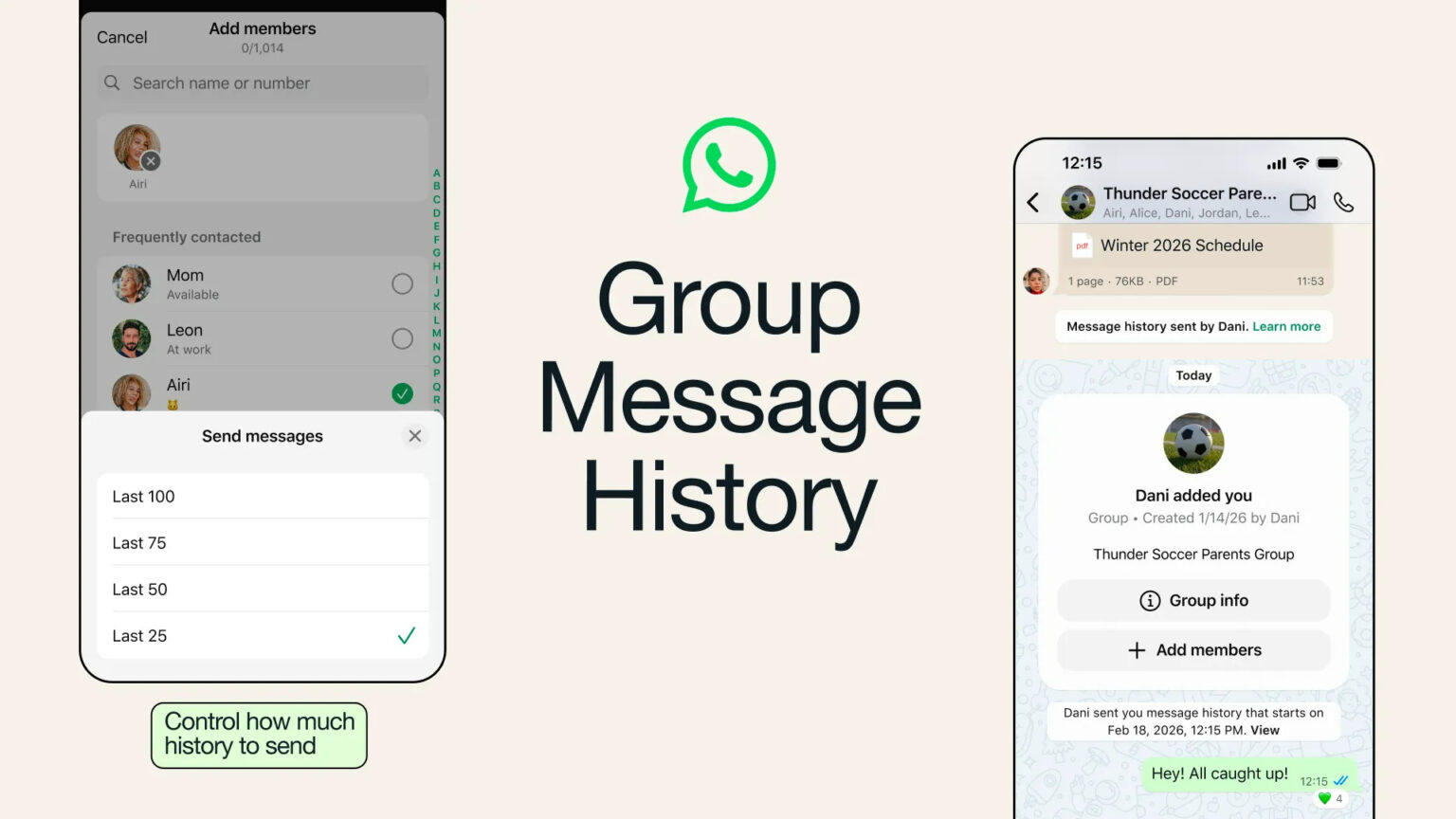
When an admin or an authorized member adds someone to a group, a new toggle appears: “Send message history.” * Users can choose to share a batch of 25, 50, or up to 100 recent messages.
- This ensures the newcomer gets the “vibe” and the immediate context without being overwhelmed by the entire history of a group that might have existed since 2014.
B. The 24-Hour/14-Day Logic
Depending on the version of the rollout (standard vs. beta), the system filters “relevant” history. In highly active groups, the feature prioritizes messages from the last 24 hours. In quieter groups, it can pull from the last 14 days of activity to ensure the new member isn’t walking into a ghost town.
C. Visual Distinction
To prevent confusion, shared history messages look different. They are visually highlighted (often with a subtle background tint or a “History” tag) and include the original sender’s name and the original timestamp. This prevents a new member from thinking a message sent yesterday is happening “right now.”
2. Control and Permissions: The Admin’s New Power
One of the biggest concerns with sharing history is the loss of control. If you said something snarky about a coworker ten minutes before they were added to the group, you might not want them to see it.
WhatsApp has addressed this by making the feature non-automatic and admin-controlled:
- The “Opt-In” Approach: History is not shared by default. The person adding the new member must deliberately toggle the option on.
- Admin Overrides: Under Group Permissions, admins can decide who is allowed to share history. They can restrict this power solely to themselves or allow all members to share history when they invite someone new.
- System Notifications: Transparency is key. When history is shared, a system message appears in the chat: ” [Admin Name] shared the last 50 messages with [New Member].” This acts as a subtle warning to existing members that their recent words have been “read back” to the newcomer.
3. The Privacy Pillar: Is It Still End-to-End Encrypted?
Whenever a messaging app changes how it handles data, the first question is always: “Is my privacy at risk?”
Meta has been very clear that Group Message History does not break End-to-End Encryption (E2EE).
How encryption works with history:
Normally, E2EE means only the sender and the recipient have the “keys” to read a message. When a new person joins, they don’t have the keys for past messages. To solve this, WhatsApp’s new protocol allows a “trusted member” (the one adding the person) to securely re-encrypt the selected batch of recent messages for the new member. The data never sits unencrypted on a server; it is a peer-to-peer transfer of historical data.
Important Note: Messages that were sent as “View Once” or were deleted by the sender cannot be shared in the history batch. The system respects the current state of the chat at the moment the new member is added.
4. The Impact on Professional and Social Circles
This update moves WhatsApp from a “casual chat app” into a serious “community management tool.”
For Work and Coordination
In 2026, many small businesses in India and Europe rely almost entirely on WhatsApp. When a new freelancer or team member joins a project group, the ability to see the last 100 messages is the difference between a productive first hour and a wasted first day. It acts as a mini “onboarding document.”
For Large Communities
With the expansion of WhatsApp Communities (which can host thousands of members), the “What did I miss?” problem was becoming a logistical nightmare for admins. Group Message History allows for a much smoother flow in large-scale discussions, reducing the repetitive “scroll-up-and-read” requests that often clutter busy threads.
5. How to Enable Group Message History
If you are a group admin and want to use this feature today, follow these steps:
- Update your App: Ensure you are on the latest version of WhatsApp (H1 2026 build).
- Go to Group Info: Tap the name of your group at the top of the screen.
- Permissions: Tap on “Group Permissions.”
- Toggle on “Send Message History”: This allows you (or your members) to start sharing context.
- Adding a Member: The next time you tap “Add Member,” look for the prompt at the bottom of the contact selection screen that asks how many recent messages you’d like to include.
Conclusion: A More Inclusive Way to Chat
The “What did I miss?” update is more than just a technical fix; it’s an empathy update. It acknowledges that jumping into a moving conversation is socially exhausting. By providing a “bridge” of context, WhatsApp is making group interactions feel less like an exclusive club and more like an open, inclusive forum.
While some might worry about their past messages being “dug up,” the 100-message limit and the transparent system notifications provide enough of a safety net for most users. In the grand scheme of digital communication, the end of the “Recap Request” is a massive win for productivity and sanity.